Surface Review


This post is about the Surface, let me state that I am in no way a technical person and my husband has had absolutely no influence on this.

I’ve had the surface for just over a week now and I think that is enough time to give a review. Overall I like it. I’m glad I waited for this as I was never really interested in the iPad. Just like the first iPad or any other first generation tech products, it has its flaws. I will list a few as well as what I like about it.

Cons:

  • The kickstand at the back doesn’t open far enough. I like to play the game Wordament (currently only available for Windows users) at night and I have to prop it up with my leg or the sheet. Nothing major but I imagine this will be fixed on the next one.
  • There is a lag in opening some apps. You can open the app and wait about 10secs or more for it to load and be ready to use. I don’t know the cause of this but I know it’s something minor that will be fixed eventually as well.
  • IE10 takes forever to load a page. Personally I use Chrome with Bing search, so I have no problem with the results I get but pages do take a while to load.
  • I have to go to desktop mode to see how much battery power I have left. I think this is something that should be seen easily. Have a little icon in the corner or something. I know it’s all about clean lines etc but it should be more accessible.
  • Closing apps is not easy with the finger swipe down once you’ve pulled it from the side. Mine never close and I have to just let them close on their own or right click with the Touch Cover or press and hold the corner in hopes that I get the Close button to come up. Womp.
  • One of my biggest issues is the WordPress app, this has nothing to do with the Surface but the people who created the app. I was hoping that I can manage my blog easily from an app and not have to log into it from a web page, but I was wrong. The app allows you to read Freshly Pressed and to create a new post. Not check my stats, look at past posts, or even read posts from people I follow. I’m hoping whoever created this app looks into making it more about managing your blog than just adding a new post.
  • There aren’t any cute girly cases for it as yet :(.

Pros:

  • I LOVE, LOVE, LOVE, LOVE that Word, Excel, Powerpoint and One Note come with the Surface (I don’t use One Note but this is just for informational purposes). I love writing or jotting down notes and if pen and paper aren’t handy, some kind of notes app or even Word is a blessing when I can edit anything just to transfer.
  • There is a USB Port. Enough said. (Apple – Womp!)
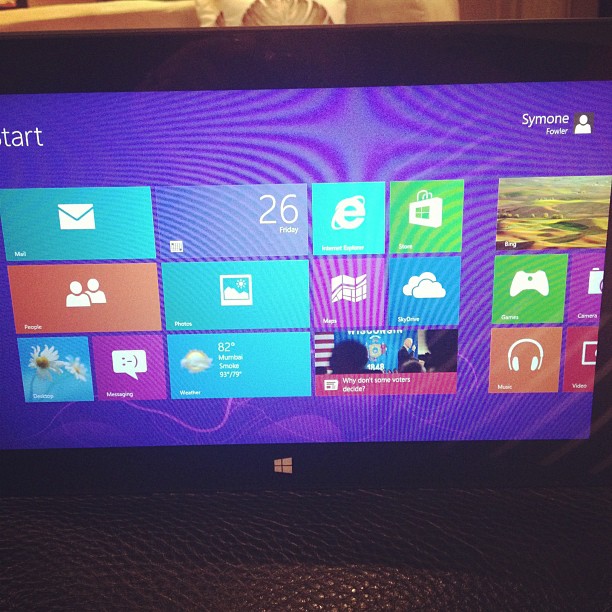
  • Personalization 1:The live tiles are a huge plus. It really is nice to just see everything updated without opening anything. This design truly caters to the person on the go. As soon as Whatsapp fixes its Windows phone app I will be getting one. It would be a plus if Instagram would hop on there too :P. But I like knowing that I can pin my husband and friends to the Start Screen. Tiles can also be adjusted and moved easily to customize you Start Screen further. Who says you have to keep what they have there!
  • It’s lightweight. I will definitely be taking this with me on my trips and not my laptop. It has everything I’ll need (even if I have to use web pages). I won’t have to worry about extra weight to my handbag.
  • I love the camera on it! Since I got it, I’ve been using it to Skype with my family, and the kickstand is perfect here because when I place it on a table next to me it’s at the right height and everything. (Would still be nice for it to be adjustable though).
  • Personalization 2: I love that I could customize the colours! I’m an Amethyst girl and I’ve always gravitated towards purple and pinks. I’ll survive until I can get a purple/pink case for it. But I told my husband to give me purple for my Start Screen :D.
  • Everything can be uploaded to your Skydrive (store files online) easily.
  • The cover is also a keypad! I mean, you already have two keyboard options on the screen – you can split the keyboard for typing with your thumbs or have the full keyboard if you like finger pecking, BUT if you’re not in the mood for touch screen typing, just use the cover! It’s not bulky, not extra weight AND it protects your screen when not in use. And the Touch Cover comes in four colours: blue, white, black and pink.
  • Windows 8 is really easy to learn with all the swiping from the top and bottom and sides. And if you didn’t follow the tutorial, Bing it! You’ll get the hang of it quickly.
  • I’m totally obsessed with Wordament! (This should’ve been higher on the list but I wanted to cover some other stuff first :P)
  • Nothing else to say (now). Get one.
This picture was taken the night I got it. I have since moved the tiles around and adjusted the sizes of them to suit me!

xx

Surface


As if I hadn’t done enough posts for the last couple of days, I HAD to add this one! Microsoft just announced it’s latest hardware – Surface. I WANT ONE NOW!!!!! I got my MacBook Air last September because my old Dell was coming to her end and being really annoying and I was skeptical about learning new commands etc on Apple, but I am dying to get my hands on a Surface with a pink cover! I do miss Windows. Yes, I use a Mac but I love my Windows software. No I am not advertising because Microsoft pays the bills around here, but I genuinely WANT one of these! Note I said with a pink cover which hubs knows is my colour to get anyway :D.

The Surface is 9.3mm thick, made from magnesium (very light- under 2lbs) has two full USB ports, camera, a built in kickstand and the Touch cover has a keyboard o it at just 3mm thick. It is just all around sexy! It will be available in Windows 8 RT and Pro. I’m not very technical but those are the basics I can give you.

Enjoy the vid and tell me what you think.

A Microsoft Wife


The ONLY reason I’m living in Seattle is because of my husband. Well his job. I hope you didn’t think this was a random place I chose on a map of America to get away from the tropics… I’d be on crack if I did. Anyway, he’s a software engineer and doing a very fine job at it. I’ve been introduced to a few wives within this industry and not all have an idea of what their husbands do, the team they’re on, their job titles, what building they’re in or even went to the Christmas party. But not me… I’ve been thrown in because I’m his best friend (I think). I know everything about what he does even if I don’t have a single clue when he’s explaining it. Technically you can say I can regurgitate it, although he can give a few analogies to help me understand what he’s really doing. 

Part of being married to this nerd (and a fine one at that ;)) is that I have come to be a little “techy” myself. He gives me such a run around that I try everything before I ask him for help. Bing, Google, reset, unplug, click everything until something happens. That is what my life is about when I’m faced with a problem with some electronic device. Two years ago, I wanted to unlock the very old iPhone we have to use at home. He refused to do it for me, said go online and figure it out. I did. And after not being able to do it after a million tries, he resolved that I had the wrong program for the phone and then he did it :D. But the point is, I tried. Normally, you only have to show me how to do something twice (max) for me to be able to do it on my own. I don’t believe someone will always be around to help me and it’s just better if I give it a shot myself. 

Keyboard shortcuts – I know a few, if I don’t, Bing it. Lost safari on my iPhone home screen the other day and was freaking out – Binged it. Got it back. (Took an hour trying on and off because one option wasn’t working >_<). Setting up wi-fi on printers, all electronics in the house – I got it covered.  Something comes on the news about a tech company – I listen and relay the story for him to follow up. Don’t know the answer? BING IT!

The other aspect of this is experimenting and being aware of websites. No I don’t read everything but, he’s read it, is infatuated with it, shares with me and then I know. I tend to know a few things going on in the tech industry before the average Joe and it also makes me to jump in and try things even if I don’t want to just to get him off my back. Google +, Facebook (new timelines), Twitter, About.me and Klout may soon be added, but all of the aforementioned I joined because of him. For him it’s more about what the company has done and he wants to use me in his personal usability study. When everyone is complaining about some change, I’ve adjusted. It’s become my way of life for dealing with my nerd, and I don’t mind. 

One thing about programers is that they don’t sleep and, somehow, he thinks this should extend to me, but I need my 8 hours (minimum, 9 is preferred). I’m up before he is, making breakfast (which I use to wake him up) and getting ready for the day. I do need my beauty sleep… not for physical appearance but to make sure I’m a pleasant person when encountered. Lack of sleep and being forced to get up against my will do not sit well with me. Since my day revolves around his, everything is scheduled around the time of his first meeting. Yes, he does not do 8-4.30/9-5/10-6. I’m very spoiled in this regard. I only see 7am when I’m going to the gym for 9am or flying somewhere, not because he has to be at work for 8 and even then, that’s not guaranteed to happen at least once for the year. *Amen*. However, he works non-stop. The lack of sleep is due to him working on something that has to work before he goes to bed. I’m still trying to break this habit so he can get more sleep but I’m positive this year will see a better sleep schedule.

The most important part of being a Microsoft wife is to be supportive. He hasn’t gotten where he is solely on the fact that he’s always up working but he has me making sure everything else is being looked after. But hard work is rewarded with a lot of play time which is what makes us happy people.

xx